> For the complete documentation index, see [llms.txt](https://docs.holoplot.com/llms.txt). Markdown versions of documentation pages are available by appending `.md` to page URLs; this page is available as [Markdown](https://docs.holoplot.com/holoplot-control/maintaining-the-system/device-events-list.md).
# Event Log
Find, filter, inspect, and export recorded device and system events.
The Event Log records changes reported by Modules, Controllers, Processors, and the system. Entries remain available while the system is running. Open it with **Event Logger** in the navigation bar.
Events and health issues are calculated separately. An event records a change at the moment it happened. A health issue describes the current state of a device. The two can differ in granularity, so an event in the log does not always have a matching entry in the Issue Tracker, and the reverse is also true. For current health, see [Monitoring device health](/holoplot-control/maintaining-the-system/monitoring-device-health.md).
Event Logger
### Use the Event Log
1. Filter by severity, device type, or time period.
2. Select an event to read its full description.
3. Select **Blink** beside a Module ID to identify that Module.
4. Export all events or filtered results as a `.json` file.
#### Check events for a device
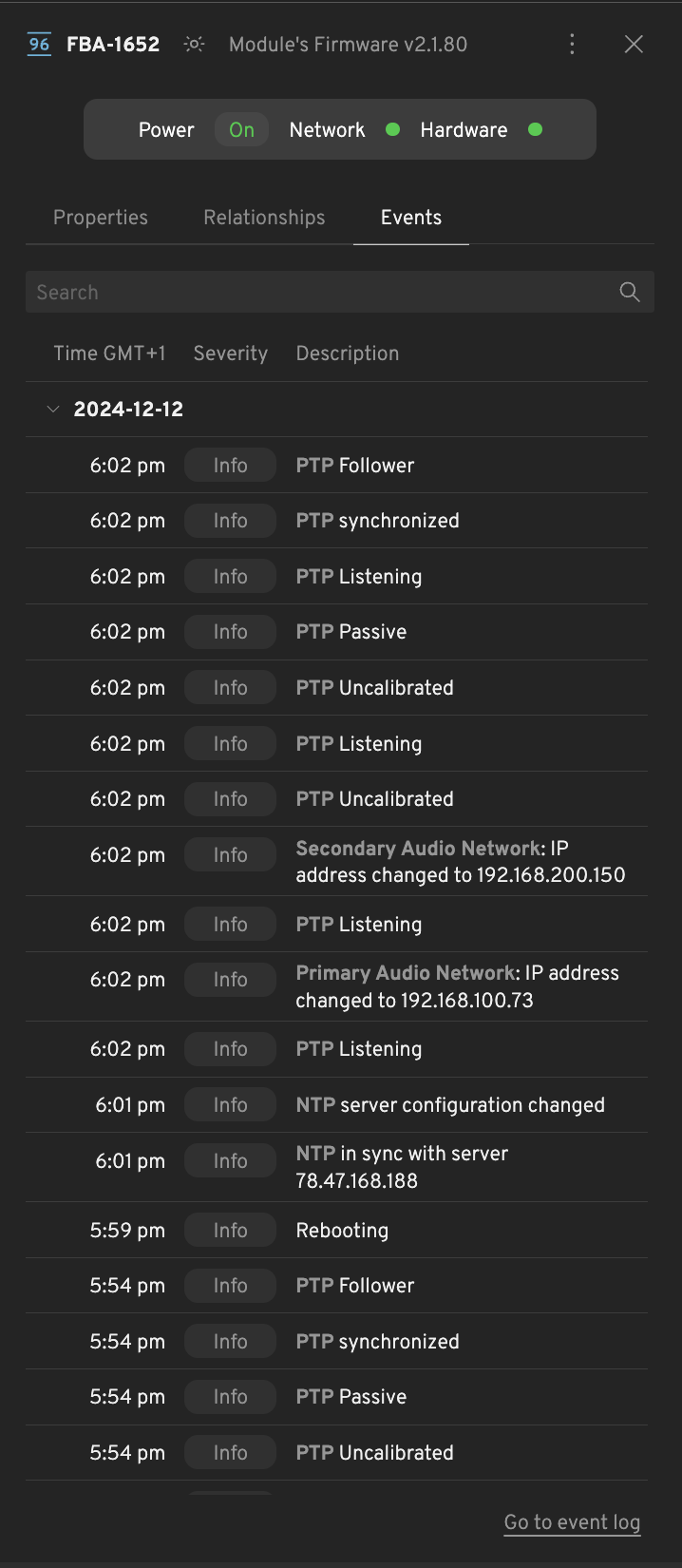
Select a device in the **Device List**, then open the **Events** tab in its side panel.
Controller side panel – Events tab
Module side panel – Events tab
### Interpret event severity
Text in braces, such as `{index}` or `{server}`, is replaced by the actual value in the log.
Every event carries one of four severities. The severity is set by the device that reports the event, not derived from the event type, so the same event type can appear at different severities.
| Severity | Meaning |
| -------- | -------------------------------------------------------------------------------------------------- |
| Info | A normal state change or a recovery. No action needed. |
| Warning | Something is degraded or unusual. The system keeps working, but the cause should be checked later. |
| Error | A component or a link has failed. Check as soon as possible. |
| Critical | A function the device depends on is unavailable. Immediate attention is needed. |
Filter the Event Log by severity, device, and time period.
#### Filter by device
The device filter narrows the log to the kinds of device you care about. The available options are the Audio Module types in your system (MD96, MD80-S, MD30, S21), Controller, Processor, and System. The Processor option appears only on systems that support Processors.
### Event reference
Expand a section to learn about events for each device.
Controller events
#### Controller events
{% hint style="info" %}
**Online and Offline are not about internet access.** They report whether the Controller is reachable inside the HOLOPLOT system network, that is, whether it is answering as a member of the cluster. Internet reachability and the connection to the HOLOPLOT VPN are reported by separate events, described below.
{% endhint %}
**Availability**
| Event | Severity | What it means | Impact / what to do |
| ------- | -------- | ----------------------------------------------------------------------------------------------------------------------------------------------------------------------------- | ---------------------------------------------------------------------------------------------------------------------------------------------------------------------------------- |
| Online | Info | The Controller answers inside the HOLOPLOT system network again. The system probes each Controller every 5 seconds, and this event marks the failing to answering transition. | None. Informational, and it confirms recovery from a preceding Offline event. |
| Offline | Error | The Controller stopped answering that probe. The event is recorded once, on the answering to failing transition, not on every failed probe. | The Controller is unreachable in the system network and counts as Critical in aggregated health. Check its power, its HOLOPLOT Control Network links, and the switches in between. |
**Cloud connectivity**
| Event | Severity | What it means | Impact / what to do |
| --------------------------------------------------------------- | -------- | -------------------------------------------------------------------------------------------------------------------------------------------------------------------------------------------------------------------------------- | ----------------------------------------------------------------------------------------------------------------------------------------- |
| Connected to internet | Info | A reachability check from the Controller to a public internet host succeeded. The check runs once per minute with a 10 second timeout. | None. Informational. |
| Disconnected from internet | Error | That same reachability check failed. This is about the Controller reaching the public internet, not about the system network. Shown as **No Internet** in the Issue Tracker. | The Controller cannot reach any online service, including the HOLOPLOT cloud. Check the site uplink, gateway, and firewall rules. |
| Connected to HOLOPLOT VPN (previously named as Wireguard®) | Info | The Controller can reach the HOLOPLOT cloud through its encrypted VPN tunnel. Wireguard® is the VPN technology behind what the Issue Tracker calls the HOLOPLOT VPN. Checked on the same one minute cycle as the internet check. | None. Informational. |
| Disconnected from HOLOPLOT VPN (previously named as Wireguard®) | Info | The Controller cannot reach the far end of its VPN tunnel, even though it may still have general internet access. Shown as **No Holoplot VPN** in the Issue Tracker. | Remote support and cloud services are unavailable for this Controller. Check that outbound VPN traffic is permitted by the site firewall. |
{% hint style="info" %}
**Reading the three connectivity signals together.** Online, internet and HOLOPLOT VPN (Wireguard®) are independent, and every combination is possible.
* Online, internet connected, HOLOPLOT VPN (Wireguard®) connected: normal operation.
* Online, internet connected, HOLOPLOT VPN (Wireguard®) disconnected: the Controller runs your system normally, but cloud services and remote support cannot reach it. This usually points at the site firewall rather than at the Controller.
* Online, internet disconnected: the local system is unaffected. Nothing reaches the cloud.
* Offline: the Controller is not answering inside the system network. It may still have internet access, and it may still be logging events locally.
{% endhint %}
**Hardware**
| Event | Severity | What it means | Impact / what to do |
| -------------------------------------------- | -------- | ----------------------------------------------------------------------------------------------------------------------------------------------------------------------------------- | ------------------------------------------------------------------------------------------------ |
| Drive `{name}` is functional | Info | The drive's self-reported health flag returned to healthy between two status snapshots, which are taken every 5 seconds. | None. Informational. |
| Drive `{name}` is faulty | Error | The drive's self-reported health flag turned unhealthy. | Storage on this Controller is degraded. Contact HOLOPLOT Support. |
| `{healthy}` of `{total}` fans are functional | Info | The number of healthy fans changed, in either direction. Fan and power supply readings are committed at most every 30 seconds so that a fluctuating reading does not flood the log. | Compare the two numbers. A drop means cooling capacity was lost and the Controller may overheat. |
| PSU `{id}` is functional | Info | That power supply returned to healthy. | None. Informational. |
| PSU `{id}` is faulty | Error | That power supply reported an input voltage below what is expected. | Power redundancy is reduced. Check the feed and the supply itself. |
**Time synchronization**
| Event | Severity | What it means | Impact / what to do |
| ---------------------------------- | -------- | ---------------------------------------------------------------------------------------------------------------- | ----------------------------------------------------------------------------------------------------------------------------------------------------------------------------------- |
| NTP in sync with server `{server}` | Info | The Controller is synchronized to the named time server, or switched to a different one. | None. Informational. |
| NTP not in sync | Critical | The Controller no longer has a synchronized time server. | On Controllers, loss of NTP synchronization is always Critical. Timestamps and coordination between devices are affected. Check the configured time servers and their reachability. |
| NTP server configuration changed | Info | The list of configured time servers gained or lost entries. This is a configuration change, not a health signal. | None. Informational. |
**Network interfaces**
| Event | Severity | What it means | Impact / what to do |
| ---------------------------------------------------- | ------------------------------------------------- | ---------------------------------------------------------------------------------------------------------------------------------------------------------------------- | ------------------------------------------------------------------------------------------ |
| Interface `{ports}`: Link up | Info | The interface link came up. | None. Informational. |
| Interface `{ports}`: Link down | Error | The interface link went down. While the link is down, no further IP or speed events are recorded for that interface. | Check the cable, the port, and the switch. See also the network role events below. |
| Interface `{ports}`: IP addresses changed to `{ip}` | Info | The interface's address list changed while it still holds at least one address. Losing or regaining all addresses is reported through the network role events instead. | None. Informational, unless the change was unexpected. |
| Interface `{ports}`: Link speed changed to `{speed}` | Error if below the expected speed, otherwise Info | The negotiated link speed changed. | A speed below the expected value points to a cable, port, or switch configuration problem. |
**Network role events**
A role describes what a network is used for. Several physical interfaces can serve one role, and one role event is recorded per affected role, not per interface. For how the roles map onto the physical network topology, see the [Networking overview](/user-guides/holoplot-system-deployment/networking-overview.md#network-roles).
| Event | Severity | What it means | Impact / what to do |
| -------------------- | -------- | -------------------------------------------------------------------------------------------------------------- | ----------------------------------------------------------------------------------------------------------------------------------------------- |
| `{Role}` established | Info | Every interface serving that role is up, holds its addresses, and runs at the expected speed again. | None. Informational, and it confirms recovery from an interruption. |
| `{Role}` interrupted | Error | An interface serving that role went down, lost all of its addresses, or dropped below its expected link speed. | See the table below for what each role carries. Start from the Link down or Link speed event recorded for the same Controller at the same time. |
Module events
#### Module events
{% hint style="info" %}
Amplifier, power supply, sublink, and driver status events are suppressed while a Module is waking up, going to sleep, rebooting, or while its hardware is still initializing. Driver status events are also suppressed while a driver test is running, because the results are reported once at the end of the test.
{% endhint %}
**Firmware and maintenance**
| Event | Severity | What it means | Impact / what to do |
| -------------------- | -------------------------- | ------------------------------------------------------------------------------------------------------------------------------------------------------------------------------------------------- | -------------------------------------------------------------------------------------------------------------- |
| Rebooting | Info | A reboot has started. This covers both operator-requested reboots and the reboot that activates a newly installed firmware. | None. Informational. |
| Reboot complete | Info | The Module firmware finished starting up. | None. Informational. |
| Update started | Info | The Module began applying a downloaded firmware update. | None. Informational. |
| Update failed | Warning | The firmware update failed while downloading, verifying, or applying. There is no separate success event, so a following Reboot complete indicates the Module came back up. | The Module keeps running its previous firmware. Retry the update. |
| Driver test started | Info | A driver test was requested for this Module. If a test is already running, the request is rejected and no event is recorded. | None. Informational. See [Module driver test](/holoplot-control/maintaining-the-system/module-driver-test.md). |
| Driver test failed | Warning | The driver test did not complete. | No driver results were produced. Run the test again. |
| Driver test complete | Info, Warning, or Critical | The driver test finished. Info when no driver failed. Critical when the number of failed LF or HF drivers reaches the threshold for that Module type. Warning for any smaller number of failures. | For Warning and Critical, inspect the per-driver results in the Module side panel. |
**Amplifiers**
One event is recorded per amplifier whenever its status code changes. `{index}` identifies the amplifier, and `{temperature}` is the measured value.
| Event | Severity | What it means | Impact / what to do |
| ----------------------------------------------------------- | -------- | ---------------------------------------------------------- | --------------------------------------------------------------------------- |
| **AMP `{index}`** Functional | Info | The amplifier is operating normally. | None. Informational. |
| **AMP `{index}`** Idle | Info | The amplifier is idle. | None. Informational. |
| **AMP `{index}`** Suspended | Info | The amplifier is suspended. | None. Informational. |
| **AMP `{index}`** Error | Error | The amplifier reported a fault. | Output from this amplifier is compromised. Check the Module side panel. |
| **AMP `{index}`** Initializing | Error | The amplifier is starting up. | Transient during start-up. Persisting means the amplifier is not coming up. |
| **AMP `{index}`** Updating | Error | The amplifier firmware is being updated. | Transient. Wait for the update to complete. |
| **AMP `{index}`** Debricking | Error | The amplifier is in recovery mode. | Wait for the recovery to complete. Repeated occurrences need service. |
| **AMP `{index}`** Requires power cycle | Error | The amplifier needs to be power cycled. | Power cycle the Module. |
| **AMP `{index}`** Power cycling | Error | The amplifier is being power cycled. | Transient. Wait for it to finish. |
| **AMP `{index}`** High temperature (`{temperature}`) | Error | The amplifier is hot but still within its operating range. | Check airflow and ambient temperature. |
| **AMP `{index}`** Above temperature limit (`{temperature}`) | Error | The amplifier exceeded its safe operating temperature. | Output is at risk. Reduce load and improve cooling. |
| **AMP `{index}`** Unknown | Error | The amplifier status cannot be determined. | Check whether the Module is reporting at all. |
**Power supplies**
One event is recorded per power supply whenever its status code changes.
| Event | Severity | What it means | Impact / what to do |
| ----------------------------------------------------------- | -------- | ------------------------------------------------------------- | ------------------------------------------------------------------- |
| **PSU `{index}`** Functional | Info | The power supply is operating normally. | None. Informational. |
| **PSU `{index}`** Initializing | Info | The power supply is starting up. | None. Informational. |
| **PSU `{index}`** Suspended | Info | The power supply is suspended. | None. Informational. |
| **PSU `{index}`** Error | Error | The power supply reported a fault. | The PSU feeding the amplifiers is at fault. Power cycle the Module. |
| **PSU `{index}`** Updating | Error | The power supply firmware is being updated. | Transient. Wait for the update to complete. |
| **PSU `{index}`** Requires power cycle | Error | The power supply needs to be power cycled. | Power cycle the Module. |
| **PSU `{index}`** Power cycling | Error | The power supply is being power cycled. | Transient. Wait for it to finish. |
| **PSU `{index}`** High temperature (`{temperature}`) | Error | The power supply is hot but still within its operating range. | Check airflow and ambient temperature. |
| **PSU `{index}`** Above temperature limit (`{temperature}`) | Error | The power supply exceeded its safe operating temperature. | Reduce load and improve cooling. |
| **PSU `{index}`** Unknown | Error | The power supply status cannot be determined. | Check whether the Module is reporting at all. |
**Sublinks**
Sublink events apply to X1-MD80S and X1-S21 Modules only.
| Event | Severity | What it means | Impact / what to do |
| ------------------------------------ | -------- | -------------------------------------------------------- | --------------------------------------------------------------------- |
| **AMP IPAL** Functional | Info | The sublink is operating normally. | None. Informational. |
| **AMP IPAL** Error | Error | The sublink reported a fault. | Check the sublink cabling between the cabinets. |
| **AMP IPAL** Initializing | Error | The sublink is starting up. | Transient during start-up. |
| **AMP IPAL** Updating | Error | The sublink firmware is being updated. | Transient. Wait for the update to complete. |
| **AMP IPAL** Connection lost | Error | The sublink connection dropped after having been up. | Check the sublink cabling and connectors. |
| **AMP IPAL** is not connected | Error | No sublink connection is present. | Confirm the sublink is cabled, then check the connector at both ends. |
| **AMP IPAL** High temperature | Error | The sublink is hot but still within its operating range. | Check airflow and ambient temperature. |
| **AMP IPAL** Above temperature limit | Error | The sublink exceeded its safe operating temperature. | Reduce load and improve cooling. |
| **AMP IPAL** Unknown | Error | The sublink status cannot be determined. | Check whether the Module is reporting at all. |
**Drivers**
One event is recorded per driver whenever its status changes. `{type}` is the frequency band and `{index}` identifies the driver.
| Event | Severity | What it means | Impact / what to do |
| ---------------------------------------------- | -------- | ------------------------------------------------------------------------------------------- | ------------------------------------------------------------------------------------------------------ |
| **`{type}` driver `{index}`** within tolerance | Info | The driver measures within its expected tolerance. | None. Informational. |
| **`{type}` driver `{index}`** failed | Error | The driver measures below its expected tolerance. | The driver is not performing as expected. Inspect the Module and plan service. |
| **`{type}` driver `{index}`** above tolerance | Error | The driver measures above its expected tolerance. | Inspect the Module and plan service. |
| **`{type}` driver `{index}`** unknown | Error | The driver status cannot be determined. Drivers report unknown until a driver test has run. | Run a [driver test](/holoplot-control/maintaining-the-system/module-driver-test.md) to obtain results. |
**Time synchronization**
| Event | Severity | What it means | Impact / what to do |
| -------------------------------------- | -------- | -------------------------------------------------------------------------------------------------------------------------- | --------------------------------------------------------------------------------- |
| **NTP** in sync with server `{server}` | Info | The Module is synchronized to the named time server, or switched to a different one. | None. Informational. |
| **NTP** not in sync | Warning | The Module lost NTP synchronization. On Modules this is a Warning, unlike Controllers and Processors where it is Critical. | Check the configured time servers and their reachability from the Module network. |
| **NTP** server configuration changed | Info | The list of configured time servers gained or lost entries. | None. Informational. |
**PTP**
Two kinds of PTP event exist. The synchronization event reports the Module's overall clock state, taking network redundancy into account. The interface events report the raw PTP state of one interface.
| Event | Severity | What it means | Impact / what to do |
| ------------------------ | -------- | --------------------------------------------------------------------------------- | ------------------------------------------------------------------------------------------------------------------------------- |
| **PTP** synchronized | Info | The Module's audio clock is synchronized, taking network redundancy into account. | None. Informational. |
| **PTP** not synchronized | Critical | The Module's audio clock is not synchronized. | On Ravenna Modules this is Critical for health. Audio playback is compromised. Check the PTP grandmaster and the Audio Network. |
The following events report a change of the PTP clock state on one Module interface. They are always recorded as Info, because a Module moves through several of these states in normal operation.
| Event | Severity | What it means | Impact / what to do |
| -------------------- | -------- | ----------------------------------------------------------------------------------------------------------------------------------------------- | ---------------------------------------------------------------------------------------------------------- |
| **PTP** Grandmaster | Info | The interface is the selected grandmaster clock. | In production, enable Follower-only mode unless Modules should provide the clock. |
| **PTP** Leader | Info | The interface is sending PTP timing messages as a leader. | In production, enable Follower-only mode unless Modules should provide the clock. |
| **PTP** Pre-Leader | Info | The interface is transitioning into the leader role. | Transient. If it persists, check the PTP configuration and grandmaster reachability. |
| **PTP** Follower | Info | This interface selected the best available clock through BMCA and synchronizes through it. Only one interface per Module can be a follower. | Normal operation. |
| **PTP** Passive | Info | The interface hears a qualified clock, but another interface is the selected PTP path. It continues tracking foreign masters for fast failover. | Normal standby operation. |
| **PTP** Listening | Info | The interface has no qualified foreign leader. It waits for PTP Announce messages and does not exchange Sync or Delay messages. | Expected briefly during startup. If it persists, check PTP Announce traffic and the network configuration. |
| **PTP** Uncalibrated | Info | The interface selected a clock and is completing the delay and offset exchange. | Expected briefly while synchronization converges. Investigate if it persists. |
| **PTP** Initializing | Info | The PTP stack on the interface is starting up. | Expected briefly during startup or after re-enabling PTP. |
| **PTP** Disabled | Info | PTP is disabled on the interface. | Investigate if PTP is expected on this network. |
| **PTP** Faulty | Info | The interface reports a PTP fault. | Check the Audio Network and the PTP grandmaster. |
| **PTP** Unknown | Info | The interface PTP state cannot be determined. | Check whether the Module is reporting at all. |
**Network interfaces**
`{interface}` is the Module interface, primary or secondary.
| Event | Severity | What it means | Impact / what to do |
| ------------------------------------------------------------ | ------------------------------------------------- | -------------------------------------------------------------------------------------------------------------------- | ------------------------------------------------------------------------------------------------------ |
| **`{interface}` Interface**: Link up | Info | The interface link came up. | None. Informational. |
| **`{interface}` Interface**: Link down | Error | The interface link went down. While the link is down, no further IP or speed events are recorded for that interface. | Check the cable, the port, and the switch. |
| **`{interface}` Network**: IP address changed to `{ip}` | Info | The interface's address list changed and it still holds at least one address. | None. Informational, unless the change was unexpected. |
| **`{interface}` Interface**: Link speed changed to `{speed}` | Error if below the expected speed, otherwise Info | The negotiated link speed changed. | A speed below 1 Gbps counts as a network error for Module health. Check the cable and the switch port. |
Processor events
#### Processor events
**Software**
| Event | Severity | What it means | Impact / what to do |
| --------------------------------------------------- | -------- | ---------------------------------------------------------------------------------- | ------------------------------------------------------------------------------------------------------------- |
| **DSP Configuration** received | Info | The Processor received a valid DSP configuration. | None. Informational. |
| Waiting too long for **DSP Configuration** | Critical | The Processor has been waiting for its DSP configuration beyond the expected time. | The Processor cannot process audio until it is configured. Check the connection to the Controller. |
| **DSP Configuration** is invalid | Critical | The Processor rejected the DSP configuration it received. | The Processor cannot process audio. Try reloading the project or review it with the System Design Tool. |
| **DSP Configuration** status is unknown | Critical | The configuration state cannot be determined. | Check whether the Processor is reporting at all. |
| **Audio Engine** is processing | Info | The audio engine is running normally. | None. Informational. |
| **Audio Engine** processing is unstable | Warning | The audio engine reported a warning state, such as audio buffer under or overruns. | Audio may glitch. Check Processor load and the audio network. |
| **Audio Engine** processing terminated due to error | Critical | The audio engine stopped because of an error. | The Processor is not producing audio. If a Backup is assigned, automatic failover may follow. |
| **Audio Engine** status is unknown | Critical | The audio engine state cannot be determined. | Check whether the Processor is reporting at all. If a Backup is assigned, automatic failover may follow. |
| **CPU Usage** is normal | Info | Audio processing CPU load is within the normal range. | None. Informational. |
| **CPU Usage** is high | Error | Audio processing CPU load entered the high range. | Reduce the processing load on this Processor before it reaches the severe range. |
| **CPU Usage** is severe | Critical | Audio processing CPU load entered the severe range. | Audio processing is at risk. Reduce load immediately. If a Backup is assigned, automatic failover may follow. |
| **CPU Usage** is unknown | Critical | CPU load cannot be determined. | Check whether the Processor is reporting at all. If a Backup is assigned, automatic failover may follow. |
**Firmware and maintenance**
| Event | Severity | What it means | Impact / what to do |
| ------------------------------------------ | -------- | ------------------------------------------------------------------------------------------ | ----------------------------------------------------------------------------------------------------------------------------- |
| **Update** from `{from}` to `{to}` started | Info | The Processor began applying a downloaded firmware update. | None. Informational. |
| **Update** from `{from}` to `{to}` failed | Error | The firmware update failed while downloading, verifying, or applying. | The Processor keeps running its previous firmware. The update will re-attempt. |
| **Reboot** started | Info | A reboot has started, either operator-requested or to activate a newly installed firmware. | The Processor is unavailable until it comes back. If it is the active one of a redundant pair, automatic failover may follow. |
**Hardware**
| Event | Severity | What it means | Impact / what to do |
| ------------------------------------------------ | -------- | ---------------------------------------------------------- | ------------------------------------------------------------------ |
| **Drive `{name}`** is functional | Info | The drive's self-reported health flag returned to healthy. | None. Informational. |
| **Drive `{name}`** is faulty | Error | The drive's self-reported health flag turned unhealthy. | Storage on this Processor is degraded. Contact HOLOPLOT Support. |
| `{healthy}` of `{total}` **fans** are functional | Info | The number of healthy fans changed, in either direction. | Compare the two numbers. A drop means cooling capacity was lost. |
| **PSU `{id}`** is functional | Info | That power supply returned to healthy. | None. Informational. |
| **PSU `{id}`** is faulty | Error | That power supply reported a fault. | Power redundancy is reduced. Check the feed and the supply itself. |
**Time synchronization**
| Event | Severity | What it means | Impact / what to do |
| -------------------------------------- | -------- | --------------------------------------------------------------------------------------- | ------------------------------------------------------------------------------------------------------------------------ |
| **NTP** in sync with server `{server}` | Info | The Processor is synchronized to the named time server, or switched to a different one. | None. Informational. |
| **NTP** not in sync | Critical | The Processor no longer has a synchronized time server. | On Processors, loss of NTP synchronization is always Critical. Check the configured time servers and their reachability. |
| **NTP** server configuration changed | Info | The list of configured time servers gained or lost entries. | None. Informational. |
**PTP**
| Event | Severity | What it means | Impact / what to do |
| -------------------------------- | -------- | ----------------------------------------------------------------------------------- | --------------------------------------------------------------------------------------------------------- |
| **Audio Bridge PTP** is in sync | Info | The Processor's audio bridge clock is synchronized, taking redundancy into account. | None. Informational. |
| **Audio Bridge PTP** not in sync | Critical | The Processor's audio bridge clock is not synchronized. | Audio transport through the audio bridge is compromised. Check the PTP grandmaster and the Audio Network. |
**Network interfaces**
`{interface}` is one of Primary Audio Module Control Network, Secondary Audio Module Control Network, Primary Audio Network, or Secondary Audio Network.
| Event | Severity | What it means | Impact / what to do |
| ------------------------------------------------------------ | ------------------------------------------------- | -------------------------------------------------------------------------------------------------------------------- | ------------------------------------------------------------------------------------------ |
| **Interface `{interface}`**: Link up | Info | The interface link came up. | None. Informational. |
| **Interface `{interface}`**: Link down | Error | The interface link went down. While the link is down, no further IP or speed events are recorded for that interface. | Check the cable, the port, and the switch. |
| **Interface `{interface}`**: IP addresses changed to `{ip}` | Info | The interface's address list changed. | None. Informational, unless the change was unexpected. |
| **Interface `{interface}`**: Link speed changed to `{speed}` | Error if below the expected speed, otherwise Info | The negotiated link speed changed. | A speed below the expected value points to a cable, port, or switch configuration problem. |
***
System events
#### System events
System events are not tied to one device. They record Processor failover for a redundant pair. `{name}` is the name of the redundant Processor pair and `{to}` identifies the Processor that became active. From OS 2.6.3, automatic failover can switch in either direction. Filter the Event Logger by **System** to find them.
| Event | Severity | What it means | Impact / what to do |
| -------------------------------------------------------- | -------- | ---------------------------------------------------------------------------------------------------------------------------------------------------------------------------------------------------------------------------------------------------- | ------------------------------------------------------------------------------------------------- |
| `{name}`: Automatic **failover** Processor `{to}` | Warning | From OS 2.6.3, the system automatically switches between the Main and Backup Processors. This happens when the active Processor becomes unhealthy, stops streaming audio, or stops responding, and the condition persists past the failover timeout. | Audio continues on the healthy Processor. Investigate why the previously active Processor failed. |
| `{name}`: Manual **failover to backup** Processor `{to}` | Info | An operator switched the pair from the Main Processor to the Backup. | None. Informational. |
| `{name}`: **Reverted to main** Processor `{to}` | Info | An operator switched the pair back from the Backup to the Main Processor. | None. Informational. |
---
# Agent Instructions
This documentation is published with GitBook. GitBook is the documentation platform designed so that both humans and AI agents can read, navigate, and reason over technical content effectively. Learn more at gitbook.com.
## Querying This Documentation
If you need additional information that is not directly available in this page, you can query the documentation by asking a question.
Perform an HTTP GET request on the following URL with the `ask` and `goal` query parameters:
```
GET https://docs.holoplot.com/holoplot-control/maintaining-the-system/device-events-list.md?ask=&goal=
```
`ask` is the immediate question: it should be specific, self-contained, and written in natural language.
`goal` is what the user is ultimately trying to achieve, the reason they need the answer. Sharing it helps GitBook give you a better, more relevant answer. A goal is most helpful when it describes the outcome the user wants rather than restating the question. For example, with `ask=how do I create an API token`, a goal like `automate deployments from our CI pipeline` lets GitBook tailor the answer to that use case.
The response will contain a direct answer to the question and relevant excerpts and sources from the documentation.
Use this mechanism when the answer is not explicitly present in the current page, you need clarification or additional context, or you want to retrieve related documentation sections.