> For the complete documentation index, see [llms.txt](https://docs.holoplot.com/llms.txt). Markdown versions of documentation pages are available by appending `.md` to page URLs; this page is available as [Markdown](https://docs.holoplot.com/holoplot-plan/auto-gain-and-delay-alignment/functional-vs-spatial-systems.md).
# Functional vs spatial systems
### Functional vs Spatial Systems
Whether your function groups are configured as Functional or Spatial affects how delay alignment is calculated. This setting has no effect on gain alignment.
#### Functional Systems
Functional systems produce delay alignment results similar to a standard time alignment approach. This configuration is well suited to speech-based applications and smaller performance setups such as Left-Center-Right or stereo systems.
#### Spatial Systems
In a spatial system, delay alignment is calculated taking spatialization settings into account. This results in a more optimised spread when playing immersive content and is the recommended configuration for larger immersive projects.
***
### Spatial Fills
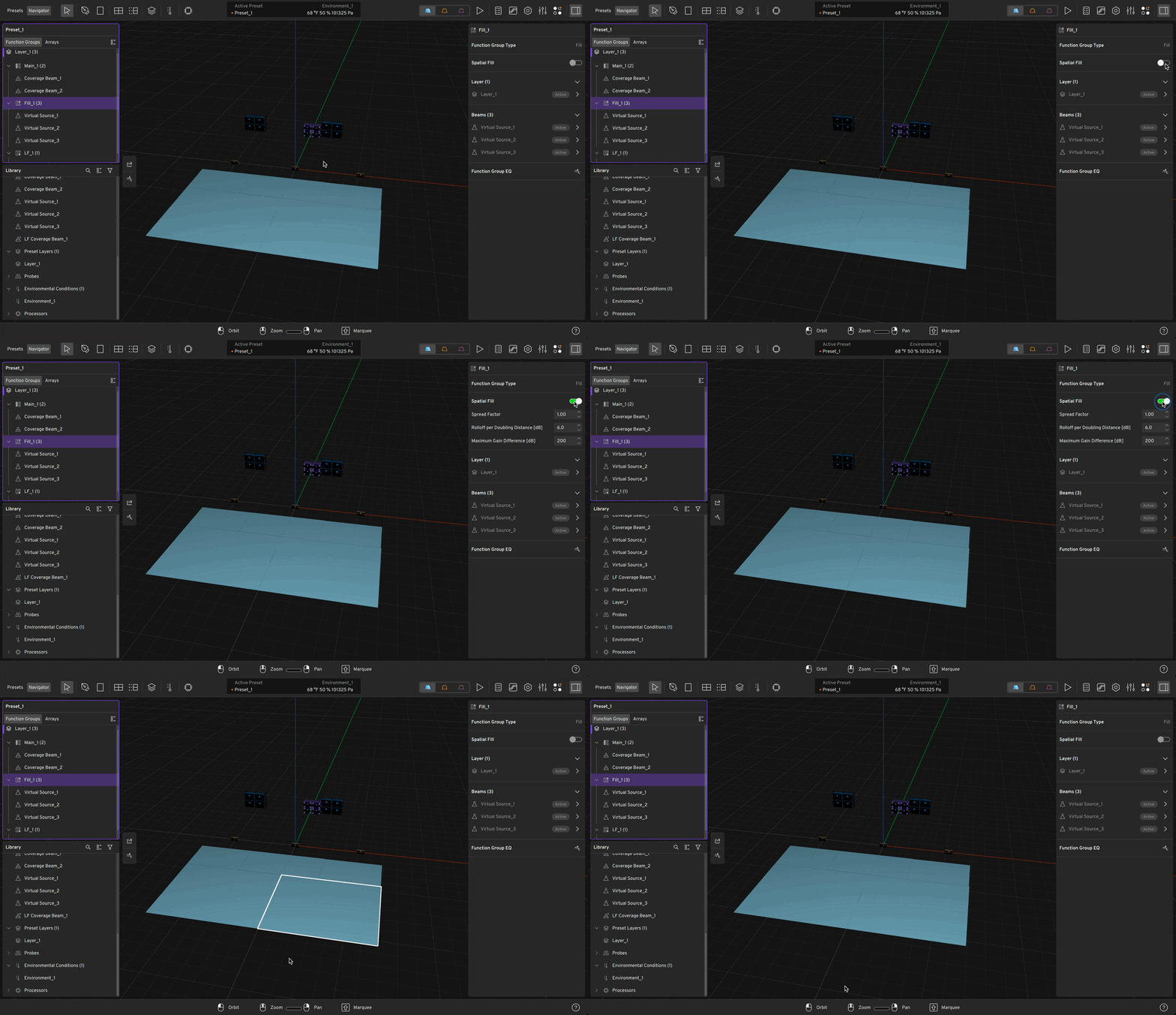
Spatial fills are a type of Function Group that can be used for auto-alignment. To configure a function group as a spatial fill, toggle its type to Spatial during Fill Function Group creation.
Spatial function groups have three additional parameters that control how the alignment behaves:
| Parameter | Description |
| ----------------------------------- | ---------------------------------------------------------------------------------------------------------------------------------------------------------------------------------------------------------------------------------------------------------------------------------------------------------------------------------------------------------------------------------------------------------------------- |
| Spread factor (more info below) | Controls how the algorithm weighs fills based on their distance to the parent beam. At 0, the nearest fill dominates the output. As the value increases, all fills are treated as more equidistant, distributing gain more evenly and preventing the algorithm from collapsing onto a single nearby fill. |
| Roll-off per doubling distance (dB) | Controls how quickly a fill's gain decreases as its distance to the parent beam increases. Lower values (around 3 dB) produce a gentler curve where fills share energy more evenly. Higher values (12 dB and above) concentrate gain on whichever fills are closest to the parent. Note: this does not model acoustic propagation — it controls how aggressively the algorithm favours nearby fills over distant ones. |
| Maximum gain difference (dB) | Sets a floor on how quiet any fill can be relative to the loudest fill in the set. After gains are calculated, any fill that falls below the maximum gain difference of the loudest fill is raised to that floor. This parameter is disabled by default (1000 dB). Meaningful values are typically between 6 and 20 dB. |
#### Setting the Spread Factor
The spread factor range is 0 to 1. The right value depends on how much you want the fill closest to the parent beam to dominate versus having all fills share gain more equally — not on how many fills you have.
**Spread factor = 0** The algorithm uses raw distances between each fill and the parent beam. If a fill is positioned very close to — or directly beneath — the parent beam, it will receive a significantly higher gain than fills further away, and may dominate entirely. This can be useful when you specifically want the nearest fill to carry most of the level.
> **Note:** If a fill is coincident with (directly at the same position as) the parent beam, a spread factor of 0 will cause it to play at maximum gain. Use a value above 0 to avoid this.
**Spread factor between 0 and 1** The algorithm adds an offset to all fill distances before calculating gains. This compresses the relative differences between near and far fills, distributing gain more evenly across the set. A value around 0.3 is a reasonable starting point for most configurations — it lifts the closest fill off the floor while still allowing proximity to have some influence.
**Spread factor = 1** All fills are treated as nearly equidistant from the parent beam regardless of their actual positions. Gains are distributed almost equally across all fills in the Function Group.
**In practice:** Start at 0 and increase if the nearest fill is dominating more than desired. If you notice one fill playing significantly louder than the others after alignment, a higher spread factor will bring the levels closer together.
---
# Agent Instructions
This documentation is published with GitBook. GitBook is the documentation platform designed so that both humans and AI agents can read, navigate, and reason over technical content effectively. Learn more at gitbook.com.
## Querying This Documentation
If you need additional information that is not directly available in this page, you can query the documentation by asking a question.
Perform an HTTP GET request on the following URL with the `ask` and `goal` query parameters:
```
GET https://docs.holoplot.com/holoplot-plan/auto-gain-and-delay-alignment/functional-vs-spatial-systems.md?ask=&goal=
```
`ask` is the immediate question: it should be specific, self-contained, and written in natural language.
`goal` is what the user is ultimately trying to achieve, the reason they need the answer. Sharing it helps GitBook give you a better, more relevant answer. A goal is most helpful when it describes the outcome the user wants rather than restating the question. For example, with `ask=how do I create an API token`, a goal like `automate deployments from our CI pipeline` lets GitBook tailor the answer to that use case.
The response will contain a direct answer to the question and relevant excerpts and sources from the documentation.
Use this mechanism when the answer is not explicitly present in the current page, you need clarification or additional context, or you want to retrieve related documentation sections.