> For the complete documentation index, see [llms.txt](https://docs.holoplot.com/llms.txt). Markdown versions of documentation pages are available by appending `.md` to page URLs; this page is available as [Markdown](https://docs.holoplot.com/holoplot-plan/simulation/zone-statistics.md).
# Zone Statistics
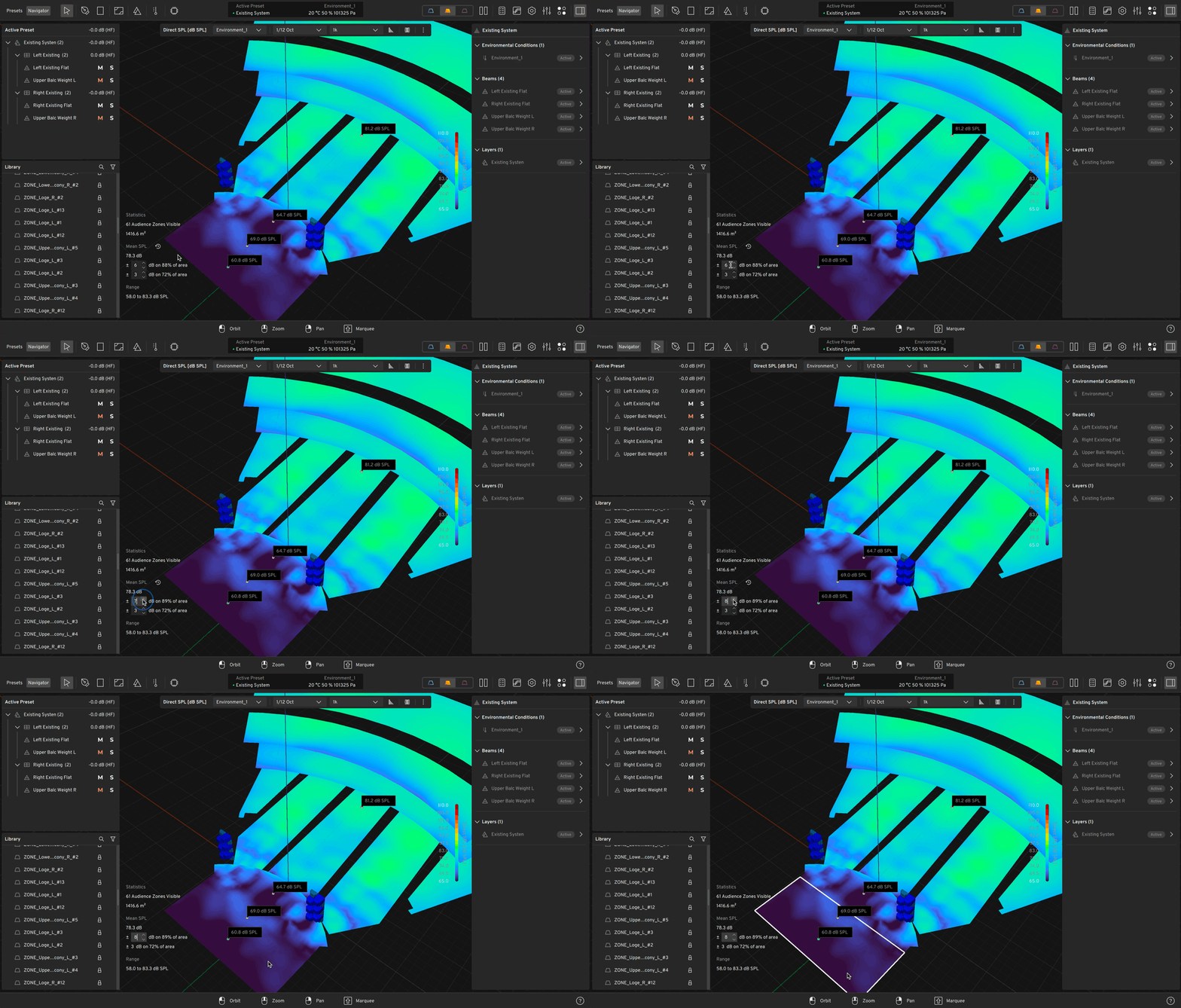
The Zone Statistics tool in HOLOPLOT Plan gives you a fast and clear overview of how well your sound system design meets SPL and delay spread targets across your selected coverage areas. This feature is available in both **SPL simulation** and **delay spread simulation** modes.
#### Overview
Zone statistics help quantify **how much of a selected zone** meets your defined performance thresholds. It’s a quick way to assess coverage uniformity (in SPL mode) or clarity (in delay spread mode) without manually inspecting the simulation maps.
***
#### How it works
**SPL simulation mode**
In SPL mode, you define a dB range (e.g., **±6 dB**) around a reference value. The tool calculates what **percentage of the selected zone(s)** falls within that range.
* **Reference value**: Based on the selected beam's simulation data.
* **Range input**: Set using the `±` input field (editable via direct input or arrow keys).
* **Result**: Displayed as a percentage (e.g., "97% of the zone is within ±6 dB").
This lets you evaluate the **uniformity of level distribution** across a zone at a glance.
**Delay spread simulation mode**
In delay spread mode, you define a **threshold in milliseconds** (e.g., **under 50 ms**), and the tool shows what percentage of the selected zone meets this clarity criterion.
* **Reference**: The tool considers each grid point’s delay spread value.
* **Threshold input**: Set in milliseconds.
* **Result**: Percentage of the area with delay spread below the chosen value.
This helps you evaluate **temporal clarity** and potential intelligibility issues.
***
#### Multi-zone support
You can apply zone statistics to **one or more zones at the same time**:
* Select multiple zones in the Plan viewport.
* Adjust the dB or millisecond range as needed.
* The displayed percentage reflects the **aggregate result** for all selected zones.
This is especially useful when comparing different areas of a venue or validating design performance across a wide audience area.
---
# Agent Instructions
This documentation is published with GitBook. GitBook is the documentation platform designed so that both humans and AI agents can read, navigate, and reason over technical content effectively. Learn more at gitbook.com.
## Querying This Documentation
If you need additional information that is not directly available in this page, you can query the documentation by asking a question.
Perform an HTTP GET request on the following URL with the `ask` and `goal` query parameters:
```
GET https://docs.holoplot.com/holoplot-plan/simulation/zone-statistics.md?ask=&goal=
```
`ask` is the immediate question: it should be specific, self-contained, and written in natural language.
`goal` is what the user is ultimately trying to achieve, the reason they need the answer. Sharing it helps GitBook give you a better, more relevant answer. A goal is most helpful when it describes the outcome the user wants rather than restating the question. For example, with `ask=how do I create an API token`, a goal like `automate deployments from our CI pipeline` lets GitBook tailor the answer to that use case.
The response will contain a direct answer to the question and relevant excerpts and sources from the documentation.
Use this mechanism when the answer is not explicitly present in the current page, you need clarification or additional context, or you want to retrieve related documentation sections.